A mobile app for you and your clients
Your booking calendar is often the first thing clients see, so it should look the part. Zenamu gives you a clean, professional design that fits your brand and keeps day-to-day management simple.
Clients browse your schedule and book on the go. You check attendance and payments, all from your phone.
It works like an app but installs in seconds, with no App Store or Google Play needed.

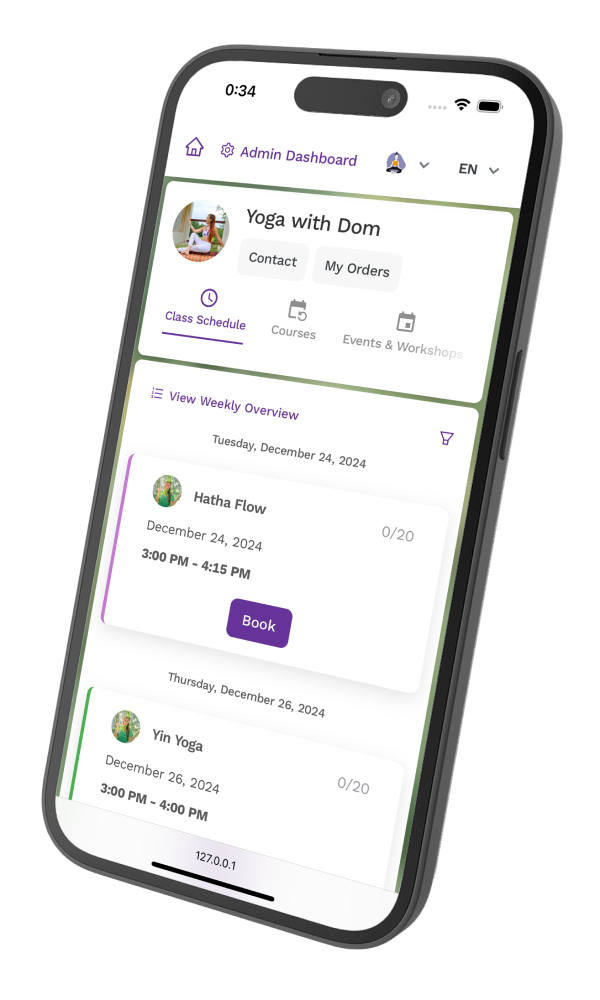
What you can do with the app
The Zenamu app covers everything clients need between classes, and everything you need when you step away from your desk.
Book on the go
Clients browse your live schedule and book a spot in seconds, from wherever they are.

View and manage bookings
Upcoming and past classes are all in one place, so clients always know what they have coming up and can cancel if plans change.

Buy passes and memberships
Clients pay for class passes, credit packs, and memberships directly in the app, with card, Apple Pay, or Google Pay.

Your balances at a glance
Clients open the app to check how many classes are left on a pass and when a membership renews.

Installs from the browser
No App Store, no Google Play. Clients open app.zenamu.com in their browser and add it to their home screen in two taps.
Works for you, too
Check attendance, manage bookings, and keep an eye on your schedule from your phone, not just your laptop.
Install on iOS
Open https://app.zenamu.com in Safari or Chrome
Or scan the QR code

- 1Tap the 'Share' icon


- 2Tap 'Add to Home Screen'


Try Zenamu for free
The mobile app is in every plan. Start for free and run your business from your phone.










Mobile app FAQ
Do clients need to download anything from the App Store or Google Play?
No. The Zenamu app is a Progressive Web App (PWA). Clients open app.zenamu.com in their browser, then add it to their home screen in two taps. It works on iOS and Android without going through any app store.
Is the app free for clients?
Yes. Clients use the app at no extra cost. The app comes included in every Zenamu plan, so there is nothing for your clients to pay to access their bookings.
What can clients do in the app?
Clients can browse your schedule, book classes, view upcoming and past bookings, and buy class passes, credit packs, and memberships.
Does the app work on both iPhone and Android?
Yes. On iPhone, clients install it from Safari. On Android, they use Chrome or Firefox. Both end up with an app icon on their home screen that works like a native app.
Can I use the app to manage my studio?
Yes. You can check attendance, manage bookings, and review your schedule from the same app. It is designed for both you and your clients.

Got questions? Check our help center.
Over 200 articles with guides and step-by-step instructions.
Visit help center