Payments and invoicing for studios and gyms
Zenamu is the payment side of your studio or gym. Take cards, Apple Pay and Google Pay, PayPal, bank transfers, cash, prepaid passes, and recurring memberships, while Zenamu keeps the receipts, invoices, and VAT in order. Start free, with no setup fee and no card required.

Every way your clients want to pay
Different clients pay in different ways. Zenamu takes them all and keeps the money, bookings, and paperwork in one place, so nothing has to be chased or reconciled by hand.
Cards, Apple Pay and Google Pay
Take Visa and Mastercard through Stripe, with Apple Pay and Google Pay built in. Setting up an account takes minutes, with no lengthy verification.

Local payment methods
Wherever your clients are, Stripe automatically shows the payment methods they already know, chosen by country and currency. Cards, Apple Pay, and Google Pay work everywhere, alongside the local options each market expects, such as iDEAL, Bancontact, BLIK, TWINT, and more.
PayPal
Add PayPal next to cards so clients can pay with the PayPal account they already have.

Bank transfer, matched without manual checks
Take payments by bank transfer and let Zenamu match each incoming payment to the right order, so you stop reconciling statements by hand.
On-site and cash
Let clients pay in person and mark the order paid in one click, for the times a card or transfer isn't the right fit.

Prepaid passes and credits
Sell entry passes and credit packs so clients prepay once and later bookings draw from the prepaid balance, which also trims your per-payment fees.
Recurring memberships
Charge memberships automatically every week, month, or year through Stripe, for steady, predictable income.

Gift vouchers and promo codes
Sell gift vouchers for revenue up front, and run promo codes to fill your quieter weeks.
Automatic bank transfer matching
Connect your bank with the EU-regulated Open Banking standard and Zenamu matches incoming transfers to orders for you, several times a day, read-only and secure. It works with over 2,500 European banks and marks orders paid without you ever opening a statement.
See how automatic bank matching works →Let clients prepay: passes or credits
Prepaid options keep clients coming back and cut your card fees, because they pay once and then book all term. Zenamu gives you two, and you can run both at the same time.
Entry passes
Simple and fixed: one entry per class
- One entry equals one class
- Categories for specific classes or instructors
- Great for promotions like 10 + 1 free
- Entries return automatically if a class is canceled
Best for: simple entry packs – universal or split by class type.
Credit packs
Flexible: a balance clients spend
- A balance of credits clients spend per class
- Best when classes cost different amounts
- Lets you set cancellation-fee windows
- Unused credit can roll into the next pack
Best for: varied pricing and flexible cancellation rules.
Multiple pass categories – one pass doesn't have to cover everything
Split your passes into separate categories and decide exactly which classes clients can use them for. Offer a pass valid:
- e.g. only for reformer Pilates classes,
- only for weekend workshops,
- or only for classes with a particular instructor.
Each category can have its own variants – say 5, 10, or 20 entries with different prices and validity. And your offer stays cleanly separate: a cheaper pass for regular classes can't be spent on the pricier reformer.
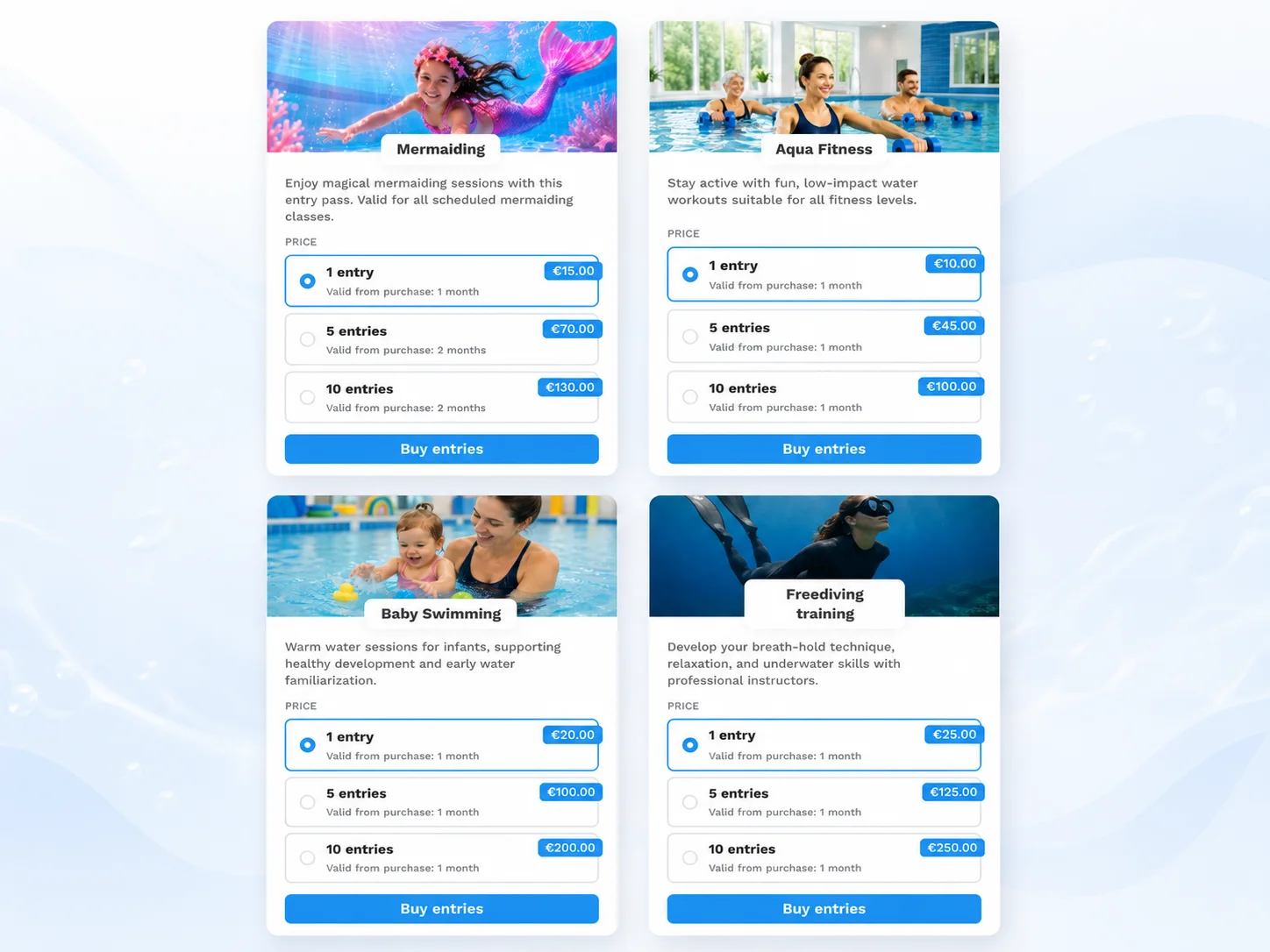
Passes and credits are prepaid up front. For payments that renew on their own, recurring memberships charge automatically every week, month, or year. See the memberships page.
Receipts, invoices, and your accounting
Getting paid is only half of it. Zenamu also produces the documents you and your clients need, keeps your VAT straight, and hands clean numbers to your accountant.

Receipts issued automatically
Zenamu issues a simple receipt the moment a card, transfer, or on-site payment goes through, ready for the client to download.

Full invoices when you need them
VAT-registered businesses get proper invoices with both parties' billing details, issued in the client's language.

Credit notes for refunds
Cancel and refund a paid order and Zenamu produces the matching credit note, so your books always balance.
VAT handled for you
Set your tax rates once and override them per event or per order; invoices show the VAT base and the tax amount separately.
Ready for your accountant
Export every order for the period you need, ready for your accountant or your bookkeeping software, with direct invoicing integrations in some markets.
You decide when you're paid out
Card payments reach your bank on the payout schedule you choose in Stripe: daily, weekly, or monthly. Zenamu never holds your funds; payouts run directly between Stripe and your account.
Payments FAQ
Which payment methods can clients use?
Clients can pay with whatever methods you switch on: card (with Apple Pay and Google Pay), PayPal, bank transfer, or on-site. They can also prepay with entry passes, credit packs, and gift vouchers, or pay automatically through a recurring membership.
Which payment gateway does Zenamu use?
Card payments and recurring memberships run on Stripe, one of the most trusted gateways in the world, with PayPal available as an extra option. Setting up a Stripe account takes minutes, with no lengthy verification.
Do my clients see local payment methods?
Yes. Stripe automatically shows the local methods that fit the country and currency of the payment, such as iDEAL, Bancontact, BLIK, Przelewy24, and TWINT, so more clients can pay the way they prefer.
Does Zenamu handle invoices and receipts?
Yes. Zenamu issues simple receipts automatically, and full invoices for VAT-registered businesses, in the client's language. When you cancel and refund a paid order, it creates the matching credit note.
How can I reduce payment fees?
Selling entry passes or credit packs means one card payment per pack instead of one per booking, which cuts the per-transaction fees. Offering bank transfer, which has no gateway fee, helps too, and higher plans remove the Zenamu platform fee.
When do I receive my money?
Card payments are paid out to your bank on the schedule you set in Stripe, whether that's daily, weekly, or monthly. Bank transfers arrive straight in your account, and Zenamu can match them to orders automatically.
Start taking payments today
Connect Stripe in minutes, switch on the methods you want, and let Zenamu handle the receipts, matching, and payouts.